Choose what a connected app can do
The person who connected an agent app can narrow its actions. Interviewers can also email a Pulse question and let the participant confirm their rating.
What changed
- Open Your connected apps under Profile & security.
- Use Email Pulse on an eligible interview.
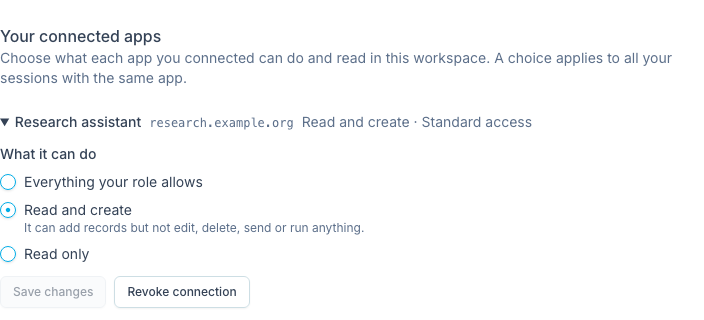
Set a connected app’s permissions
In Profile & security, open Your connected apps and select the connection. Choose Read only or Read and create, then save. The limit applies to all of your sessions with the same app in this workspace. Read and create allows new records and blocks edits, deletes, sends and runs.
Ask for a rating after an interview
Use Email Pulse on a planned or completed interview with an unanswered, single-person Pulse link. The recipient chooses a rating in the email and confirms it on the Pulse page, where they can add a comment. Answering inside Outlook requires Microsoft registration and configuration.
Follow customer email in HubSpot
Select Emails on a HubSpot conversation follow to bring incoming and forwarded customer messages into evidence. Existing follows keep their selected kinds. New follows include emails by default.
More in this release
More in this release
- New customer evidence in Huddle includes excerpts from Signals and Evidence linked to the initiative.