Choose Context Before Capability
The useful MCP comparison starts before the ticket and ends after the release.
Compare product management MCPs for research, insight management, planning, delivery and analytics, with documented strengths, limits and a practical first test.

An agent can read “add a CSV export” and produce exactly that. The awkward part comes when someone asks which fields belong in the file.
I build Zentrik, which appears in this comparison. I reviewed official documentation on September 7, 2026; I have not run a comparative benchmark or a security audit. The choices below are judgments about documented fit, not test results.
| Start with this job | Connections to examine |
|---|---|
| Understand the problem | Dovetail · Enterpret |
| Choose and define | Productboard · Aha! |
| Manage delivery | Jira · Linear |
| Check the result | Pendo · PostHog |
| Connect those decisions | Zentrik · BuildBetter |
This is a starting list, not an exhaustive ranking. The sections below explain the fit, the limits, and narrower alternatives.
Imagine a customer needs a monthly report for their finance team. In the call, they explain that finance wants invoice totals, not personal data. Later, the team agrees to build an export. The ticket keeps the feature name. The call note keeps the reason. Somewhere else, perhaps, is the agreement about what to leave out.
Now ask an agent to help.
A connection to the ticket gives it work to do. A connection to the research gives it a better account of the need. It still has to find the approved scope, respect the exclusions, and eventually check whether anyone could use the file.
That is why a product manager’s MCP shortlist should reach further than the delivery tools.
MCP, the Model Context Protocol, gives AI applications a standard way to connect to tools and data. It does not make everything in a product available to an agent. Each server exposes a particular set of operations, under particular permissions. A feature on the vendor’s home page is not necessarily an MCP tool.
Four jobs, with some untidy boundaries
A useful shortlist follows the work: understand the customer problem, choose and define a response, manage delivery, then check what happened.
These are jobs, not sealed software categories. Pendo reaches into feedback and ideas as well as analytics. Aha! spans several kinds of product work. Jira and Confluence may already hold a perfectly good explanation of a decision.
Start with the question you keep answering by hand. For our export, that might be “Who actually needs this?”, “Did we agree to include names?”, or “Did finance get a usable report?” Those questions lead to different connections.
You do not need every server below. You need access to the records that can answer your question.
1. Understand the problem: Dovetail and Enterpret
Before treating “CSV export” as a feature request, I would want to hear what the customer was trying to do. Perhaps they need a file. Perhaps they need a report that somebody else can trust. The distinction changes the work.
| Dovetail | Enterpret |
|---|---|
| Useful when: Revisit research projects, insights and customer quotes. | Useful when: Examine feedback across sources, with customer and account context. |
| Check first: Can you inspect the source context? Does your client support its authentication? | Check first: What has each theme grouped together? Which customers are missing? |
Dovetail is a natural connection to examine when your research already lives there. Its MCP and connector documentation describe bringing workspace knowledge into AI tools; the Claude connector can retrieve insights, reports, and customer quotes across projects.
The benefit is access to research in the place where it was collected and interpreted. The practical test is whether an answer leads you back to enough of the source to judge it. A striking quote without its surrounding interview can make a weak case sound convincing. Check client support, too: Dovetail documents specific authentication arrangements, so “supports MCP” is not a promise that every client will connect the same way.
Enterpret is worth considering when the question runs across a continuing stream of feedback. Its customer-intelligence model brings together sources such as support, surveys, calls, and reviews with customer and account context. Its updated MCP returns source-linked findings and attributed quotes.
For the export, I would ask which customers report the problem, in what circumstances, and whether “reporting” groups together several quite different needs. That is the attraction of working across feedback sources. The caution is in the grouping: inspect what a theme includes before treating its size as the size of an opportunity. Customers who contact support are not automatically representative of customers who stay quiet.
Dovetail and Enterpret overlap. This is not a choice between “qualitative” and “quantitative,” or between human research and AI. Start with the evidence your team maintains: research projects you need to revisit, a flow of feedback you need to understand, or both.
Four more specific needs lead to other options:
- Consult reviewed findings: Condens exposes published artifacts through a read-only server. Unpublished research is outside that documented scope.
- Work from requests and ideas: Canny connects ideas, insights, feedback, and customer-value context, with permission-dependent writes. It requires Pro or Business and Canny Ideas. Countable requests are not necessarily a representative sample.
- Analyse study data: Maze’s MCP retrieves study data; its beta announcement specifies Enterprise early access. Do not infer that retrieving a study includes creating one.
- Commission new research: UserTesting advertises an early-access MCP for recruiting participants and creating and launching studies. Confirm availability before committing to that workflow.
Reading completed research and commissioning new research are different commitments. Check account access before designing a trial around either.
2. Choose and define the work: Productboard versus Aha!
Suppose the evidence supports an export. There is still a decision to make about scope, priority, and the result worth building for.
| Productboard | Aha! |
|---|---|
| Useful when: Find and refine the Spark specs your team already reviews. | Useful when: Follow related records across Roadmaps, Discovery, Ideas and Develop. |
| Check first: The MCP is in beta. Do not assume every upstream note is exposed. | Check first: Confirm the workspace and write controls. Fields can be overwritten. |
Productboard’s official MCP server is in beta and centres on specs from Spark. It can find and read them, refine their content, exchange comments, and update status. That makes it a promising handoff when the specification your team reviews is already there.
The qualification matters. Productboard’s wider product includes feedback and insight workflows; the published MCP description is not a promise that every upstream note or Pulse capability is available through the same connection. Test whether the agent can inspect the evidence behind a spec, rather than assuming that reading the spec is equivalent.
Aha!’s server documents access across its suite, including Roadmaps, Discovery, Ideas, and Develop. It can search and retrieve supported records and reports, and create, edit, comment on, and link records. For a team whose product decisions already depend on those relationships, that breadth is a reason to begin there.
It also gives a write more places to land. Specify the workspace and record before asking an agent to change a plan. Aha! separates administrative controls for reading and writing, requires contributor access, and cannot delete whole records through MCP. It can still clear or overwrite field values.
My starting choice would be Productboard for a Spark-spec workflow and Aha! for work that needs to traverse an existing Aha! account. That is a choice of integration to trial, not a verdict on which product is better. Neither a polished spec nor a linked roadmap establishes that a team approved the inclusion of personal data.
3. Manage delivery: Jira versus Linear
The familiar Jira-versus-Linear argument becomes more useful when it starts with where the team keeps its work.
| Jira / Atlassian Rovo | Linear |
|---|---|
| Useful when: Connect Jira work to decisions in Confluence and other supported records. | Useful when: Inspect existing issues and projects through a read-only option. |
| Check first: Verify access to each space and record. Find the current decision. | Check first: Evidence held elsewhere still needs a source. The tracker cannot supply it. |
Linear’s MCP server can find, create, and update issues, projects, and comments. It also provides a read-only endpoint and a read-only OAuth scope. If your team already works in Linear, you can inspect a real project through that restricted connection before allowing edits.
That is a concrete advantage for a pilot. The limit is the material available to it. If the export’s acceptance criteria are in Linear but the exclusion of personal data is only in a research repository, access to Linear alone will not recover the missing reason. Links and additional sources may be necessary; a migration is not.
For Jira, examine Atlassian Rovo MCP, rather than a comparison that treats Jira as an isolated ticket database. Rovo spans Jira, Confluence, Jira Service Management, Bitbucket, and supported Loom content. Its tools also retrieve relationship context through the Teamwork Graph.
If the decision is in Confluence and the implementation is in Jira, this can be the more relevant starting point. Ask the agent to find both. The wider reach also makes access checks important: verify the connected user can read the specific spaces and records, and that the answer cites the current decision rather than an older discussion.
I would not move a team from Jira to Linear, or back again, to get an MCP connection. Both offer one. First test whether the existing system preserves the work’s meaning. If it does, changing trackers may solve a different problem from the one you have.
4. Check the result: Pendo and PostHog
The export shipped. Someone clicked it. Did that solve the reporting problem?
| Pendo | PostHog |
|---|---|
| Useful when: Examine usage alongside guides, surveys and Listen feedback. | Useful when: Relate product behaviour to errors, flags and experiments. |
| Check first: The documented MCP funnel tool accepts two or three steps. | Check first: Verify event meaning. Investigating a result is not permission to change flags. |
Pendo’s documented MCP tools cover usage analysis, guide performance, surveys, session-replay information, and Listen feedback and ideas. This is why I would not put Pendo in an analytics-only box. A PM can investigate behaviour alongside what customers report.
The useful comparison is between that breadth and the exact question your agent can execute. For example, Pendo’s documented MCP funnel tool accepts two or three steps. A longer sequence may need a different approach. This limit belongs to the documented tool, not to everything Pendo can do. An administrator must also enable MCP access and, separately, optional writes.
PostHog brings analytics queries, errors, feature flags, experiments, and other product operations into the agent’s reach. It is especially relevant when investigating a result means moving between product behaviour and a technical explanation. Its read-only option filters out write tools for a trial.
The tradeoff is that investigation and intervention can sit close together. Asking why a release underperformed should not silently become permission to change its flag. Nor does a well-formed query establish that the events mean what you think they mean. Check the event definition, population, and period before accepting the answer.
For the hypothetical export, Pendo’s combination of behaviour and feedback could help explain what happened after download. PostHog could help relate the attempt to usage or errors. Neither knows that finance accepted the report unless you have evidence of that outcome.
If your measurement already lives in Amplitude or Mixpanel, start there. Their official MCP servers expose product-analysis workflows; both also document write capabilities, so do not assume they are query-only connections. Moving a familiar metric into a new analytics system just for an agent would introduce another thing to reconcile.
LaunchDarkly belongs alongside these tools when the answer depends on rollout state, flags, or observability. Check deployment support: its hosted server is unavailable in its EU and federal environments, where the documentation points to the local server.
Where Zentrik fits across those jobs
The export changes shape as it moves through the team. It begins as something a customer cannot do, becomes a choice about what to build, and ends up as work whose result somebody ought to check.
We are building Zentrik to help teams carry that product intent through the work. Its MCP workflows expose records and links that an agent can follow and, within approved access, update.
For research and insight work, signals retain source evidence, while insights and opportunities capture what the team learns and which problem deserves attention. For planning, ideas describe possible responses; initiatives can retain the scope, constraints, success measures, and evidence behind the chosen work. The agent can inspect that chain when helping with a delivery handoff. Studies support further inquiry, and new evidence can be brought back into the next decision.
In the export example, the useful thing to preserve is the relationship between the finance team’s need, the agreed exclusions, and the work selected to meet it. The test for us is whether a reader can open those records and check that relationship, including where it is incomplete.
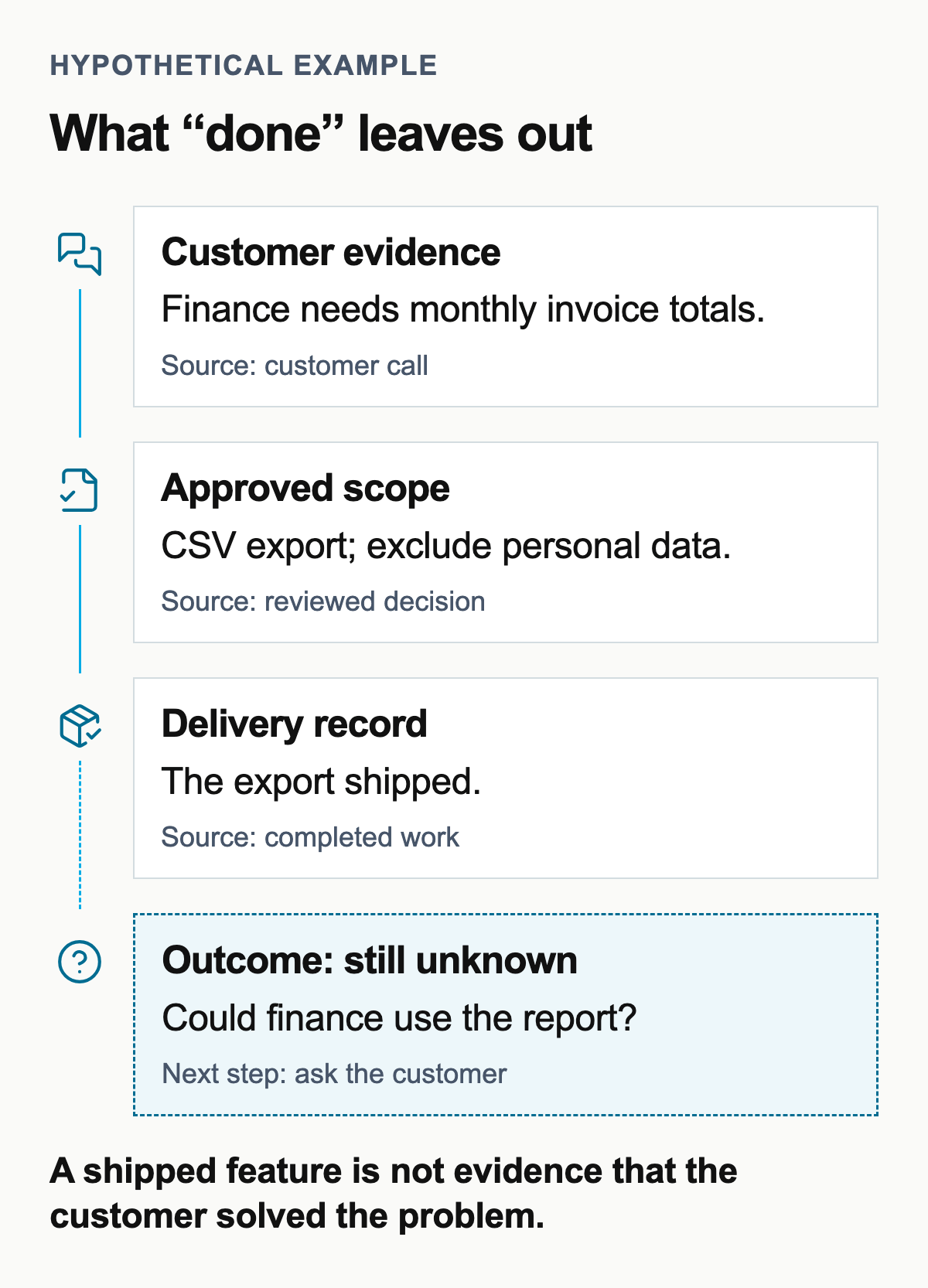
The first three records can agree while the outcome remains unknown. That blank is useful: it tells the team what to ask next. It should not be filled with an agent’s guess.
That does not make Zentrik a substitute for every specialist above. A linked result is not a native telemetry engine. A study plan is not a participant-recruiting network. Our documented study workflow keeps final review and launch in Zentrik. Connecting records also takes care: if the interpretation is wrong or the team never records the decision, an agent can retrieve a tidy account of the wrong thing.
Connected customer context is not unique to us, either. BuildBetter also brings together material such as calls, signals, company context, and documents through MCP. It deserves consideration where those are the records a team relies on.
I would trial Zentrik when people repeatedly have to reconstruct the relationship between customer evidence and chosen work. Keep the specialist tools that already serve the team well. The question is whether the product decision survives the handoffs.
Give the agent one case, not the keys to everything
Choose a small, completed change whose history you know. Use the relevant connection you already have and only records you are allowed to expose.
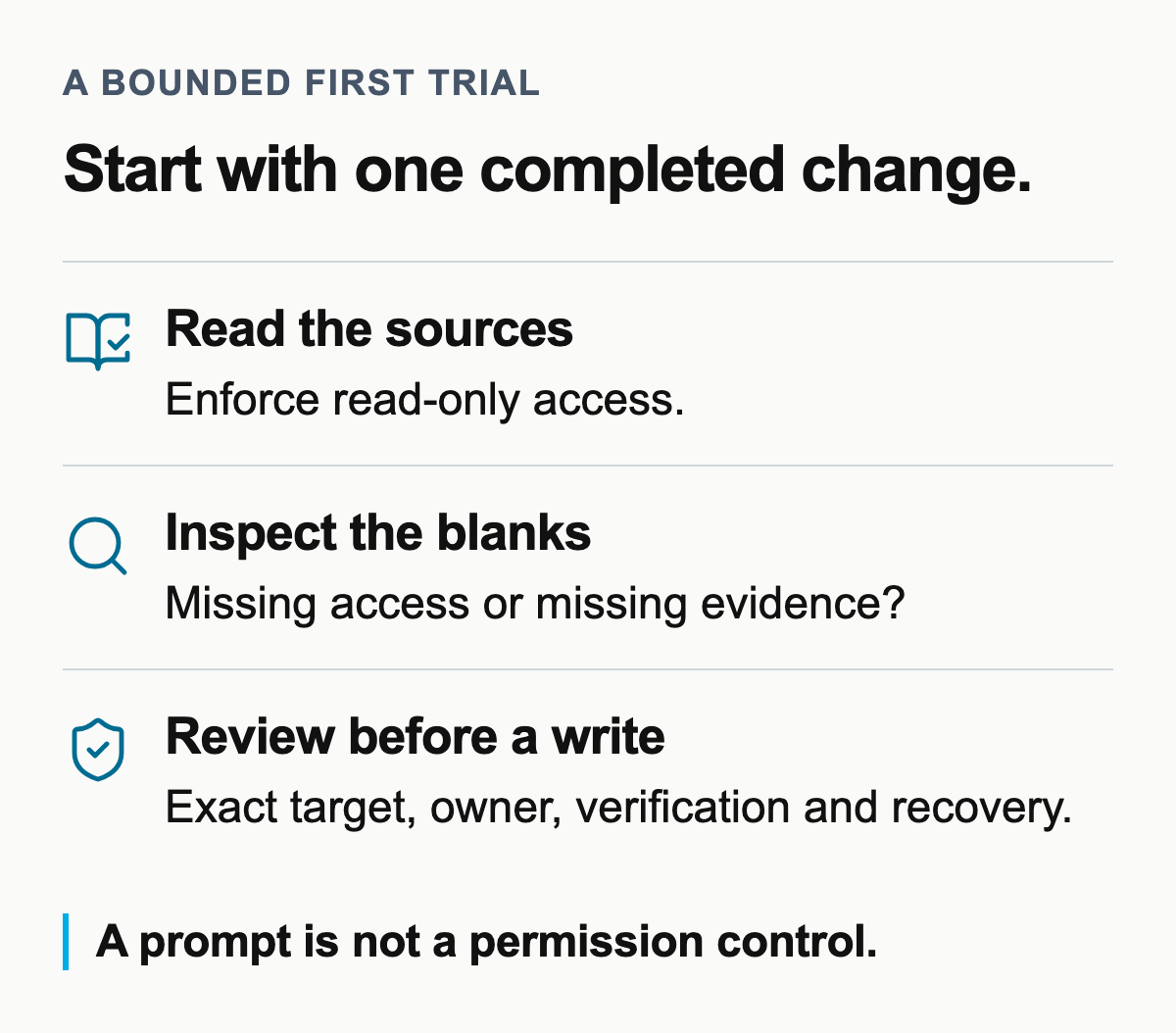
Use an enforced read-only mode where one exists. Otherwise restrict the trial to a safe test workspace or an equivalent access boundary. A prompt saying “do not write” is an instruction, not a permission control.
Ask:
Reconstruct this change from the records you can access. Show who needed it, the source evidence, the approved scope and owner, the constraints, the delivery record, and how we checked the result. Link each answer to its source. Leave anything you cannot establish blank. Do not change any records.
Use this short review before accepting the answer:
- Open the sources. Do they support the agent’s account of the need and the decision?
- Check the scope. Look for the owner, approval, and exclusions. A feature name is not enough.
- Inspect the result. Is there evidence of a customer outcome, or only evidence that work shipped?
- Keep the blanks. Mark what could not be established, then investigate why.
A missing connection is one possible explanation. An unreadable record, a stale link, an unrecorded approval, and a result nobody checked need different remedies. Add another server only when there is evidence on the other side worth connecting.
Before enabling writes, inspect the proposed change, its exact target, and how you will verify or recover it. Check workspace scope, revocation, and the record left by an action. Those are checks to perform in your environment, not assurances this comparison can give.
For our export, the agent may find the request and the finished ticket, but no evidence that finance could use the file.
At that point, the next useful action is to ask the customer.
Originally published August 15, 2026. Expanded September 8, 2026, following a review of official documentation on September 7.