Value estimates the revenue that depends on building an idea: the deals that need it and the renewals at risk without it. It shows a likely range, how much of it rests on records, and the one answer that would narrow it most.
Open an idea and select Discovery → Value, or select a value in the Ideas list. The figure is gross revenue from the month the idea ships, made for comparing ideas. Read it with its range: an estimate that rests mostly on assumptions says so.
What Value counts
Every account linked to the idea adds what it has on record:
| Account | What it adds |
|---|---|
| Customer | Its ARR (annual recurring revenue), at risk at each renewal. |
| Open deal in your CRM | The deal’s yearly value, weighted by the odds of its stage, from its close date. |
| Prospect with no open deal | Your workspace’s typical deal size, at assumed odds. |
Revenue counts from the month the idea ships. That month comes from the idea’s Effort, or from its initiative when it has one; select the ship month in the toolbar to change Effort. Use 12 months and 5 years to switch the period; every figure follows. The curve levels off about two years after the idea ships, when something else would likely meet the same need.
Linked accounts that add nothing are listed under Linked, not counted yet with what is missing, such as Add ARR or Add a deal. Ideas linked to the same deal share it, so it is never counted twice.
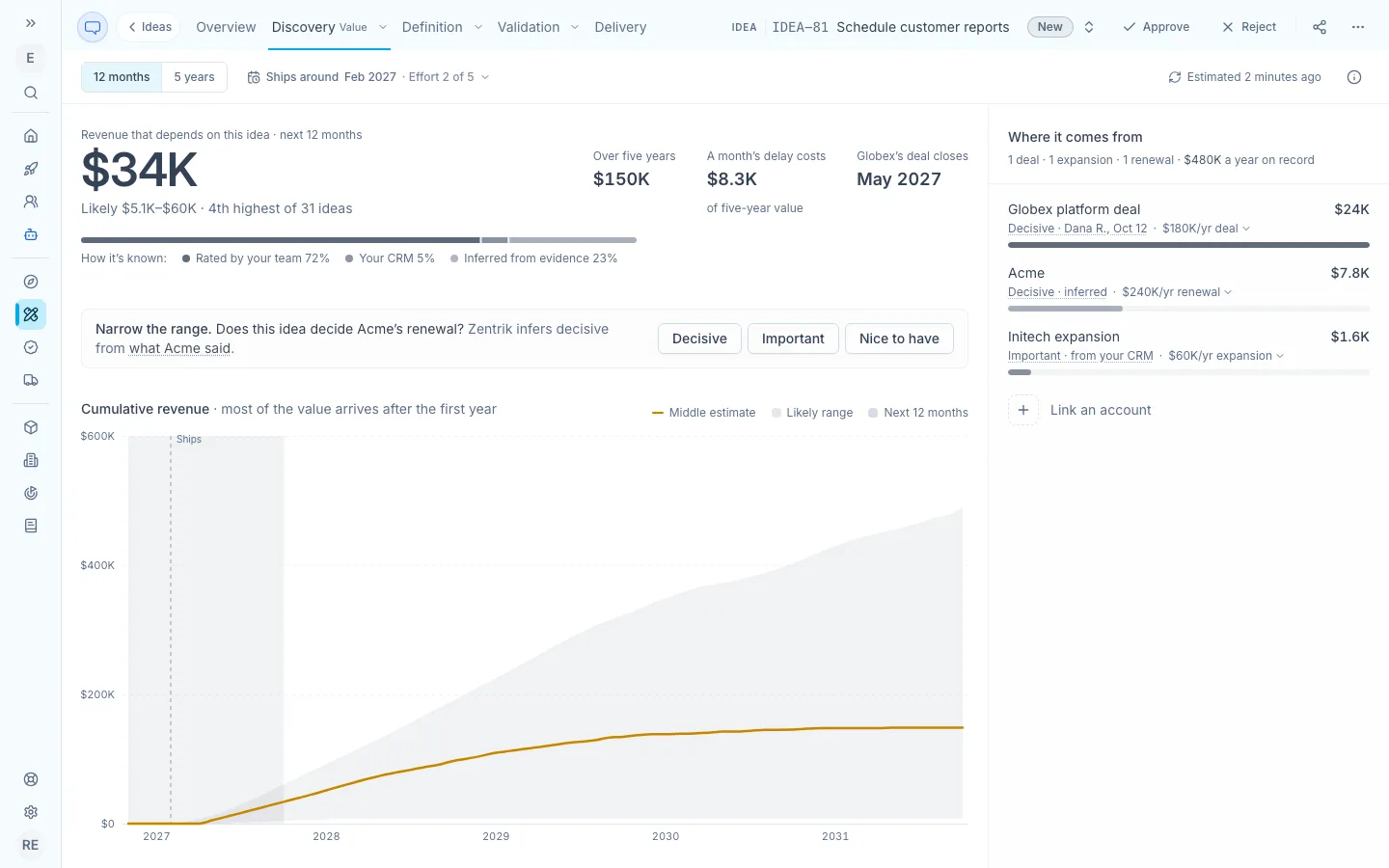
The answer and how it is known on the left, with the question that would narrow it most. The accounts it comes from are on the right.
How much an idea decides an account
Each row has a level: how much this idea decides the account’s deal or renewal. For a deal, the level sets how much of the win rests on the idea; for a renewal, how much more likely the customer is to churn at each renewal without it.
| Level | Meaning | Deal | Renewal |
|---|---|---|---|
| Decisive | They would not buy or renew without it. | 85% | 30% |
| Important | It weighs on the decision. | 30% | 8% |
| Nice to have | It would not change the decision. | 5% | 1% |
The row says how it is known: a team member’s answer, with their name and date; from your CRM, such as a product gap recorded on an opportunity; inferred from what the customer said in calls, tickets and other evidence; or assumed, when the account is only linked or is a prospect priced at a typical deal size.
A level nobody has answered is uncertain, so the estimate spreads it across all three levels. A row’s breakdown shows this as leans Important.
Add your team’s answers
Anyone who can edit Discovery can answer. Answers are the fastest way to a figure you can defend.
- Under the number, Narrow the range asks about the account whose answer would narrow the estimate most, and says what Zentrik believes now. When the level is inferred, select what [account] said to read the customer’s own words first.
- Select Decisive, Important or Nice to have. The estimate updates in place, and a line under it says what moved and why, with Undo.
- The next question appears. To answer any other account, select its level in the list of accounts, such as Important · inferred, and choose a new one. Let Zentrik estimate it again removes your answer.
An answer sets the level of that account’s deals and renewal for this idea. It never moves another account’s figures and never changes your CRM. Ideas that share the account’s deals split them, so they are estimated again within a few minutes.
How sure it is
The likely range holds 8 in 10 of the outcomes Zentrik simulates. The middle estimate has half of them above it and half below.
The bar under the number shows how the figure is known: rated by your team, recorded in your CRM, inferred from evidence, or assumed. When most of it is assumed, Value leads with the range, sets the figures lighter and dashes the curve.
The rank beside the range, such as 4th highest of 31 ideas, compares middle estimates across your workspace’s ideas. Their ranges can overlap, so compare the ranges too.
See how a row is counted
Select a row’s amount, such as $180K/yr deal, to see each step from its yearly value to the amount it adds: the odds of closing, how much of the win rests on the idea, the idea’s share when other ideas are linked to the same deal, the months that count, and timing. The CRM name opens the record, and the breakdown says when the figures last synced if that was more than a week ago.
Next to the number, A month’s delay costs shows how much five-year value each month of delay loses. [Account]’s deal closes shows the nearest customer decision. Before it ships means the deal closes first and counts only if it waits for the idea.
Troubleshooting
Value says no revenue depends on the idea yet
Link the accounts that asked for it from the idea, or connect your CRM so their ARR and deals come with them. A customer needs ARR and a prospect needs an open deal or a typical deal size in your workspace before it counts.
The value jumped after I confirmed the level Zentrik showed
Before your answer, the estimate spread that account across all three levels. Your answer removes the spread, so the account counts at the full weight of its level. The line under the number says what the answer replaced.
A deal’s amount or stage looks out of date
Open the row’s breakdown. When its figures last synced more than a week ago, the breakdown says so; select the CRM name to check the record, and check the CRM connection in Settings → Integrations.
Continue from here
Related guides
Did this guide answer your question?
Your response helps us prioritize missing or unclear documentation.
Still stuck?
Send your question to Zentrik support. This guide will be included automatically.