Reuse a source selection on demand or on a schedule. Test changes before activating them.
Set up a saved import
Use a one-time import when you want to choose particular records now. Use a saved import when Zentrik should reuse the same source boundary on demand or on a schedule.
- Connect the source under Settings → Integrations.
- Open Settings → Integrations → Imports, select New saved import, and define what can be imported and where it belongs.
- Select Create draft. A source preview is an optional spot check while you refine the rules.
- For supported conversation sources, choose whether to organize external attendees as People. Missing Account creation remains a separate opt-in.
- Select Test draft. Testing does not import records or change what the active import has already processed.
- After a successful test, select Activate tested draft. Keep it On demand or choose an interval, then review results under Runs or Imports → History.
Changes to an active import stay in a new draft. The active version keeps running until the changed draft is tested and activated.
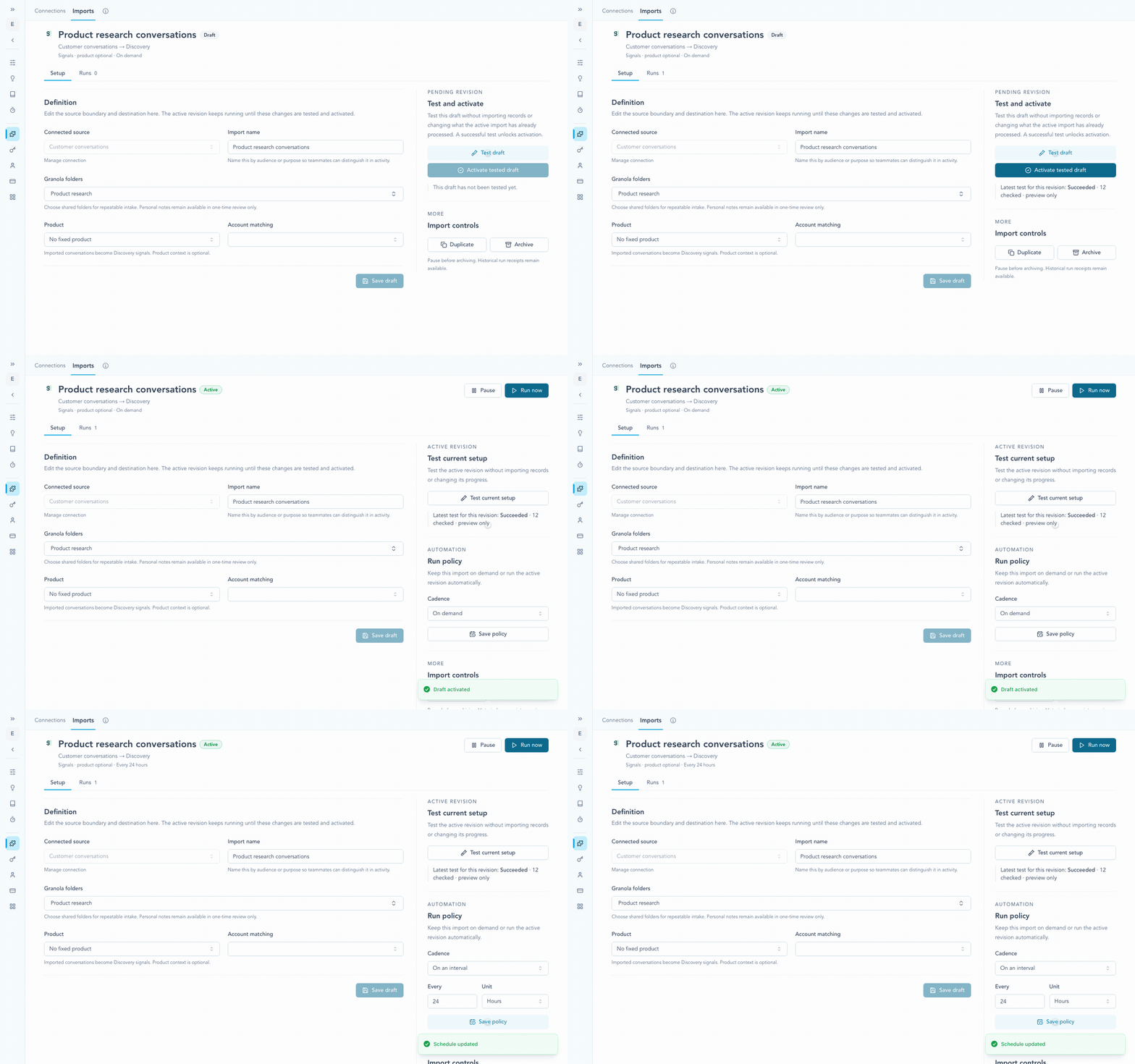
Test the draft first, activate the tested revision, then choose whether the active import runs on demand or on an interval.
Check the result
Open Runs or Imports → History after the first run. Check the created records and item-level errors. Resolve unclear account or participant matches before expanding the import.
Continue from here
Related guides
Did this guide answer your question?
Your response helps us prioritize missing or unclear documentation.
Still stuck?
Send your question to Zentrik support. This guide will be included automatically.