Keep customer accounts distinct, connect their records from other systems, and review related accounts as a company group.
Use separate accounts for customer entities your team needs to manage independently, such as locations or subsidiaries. A company group lets you review them together.
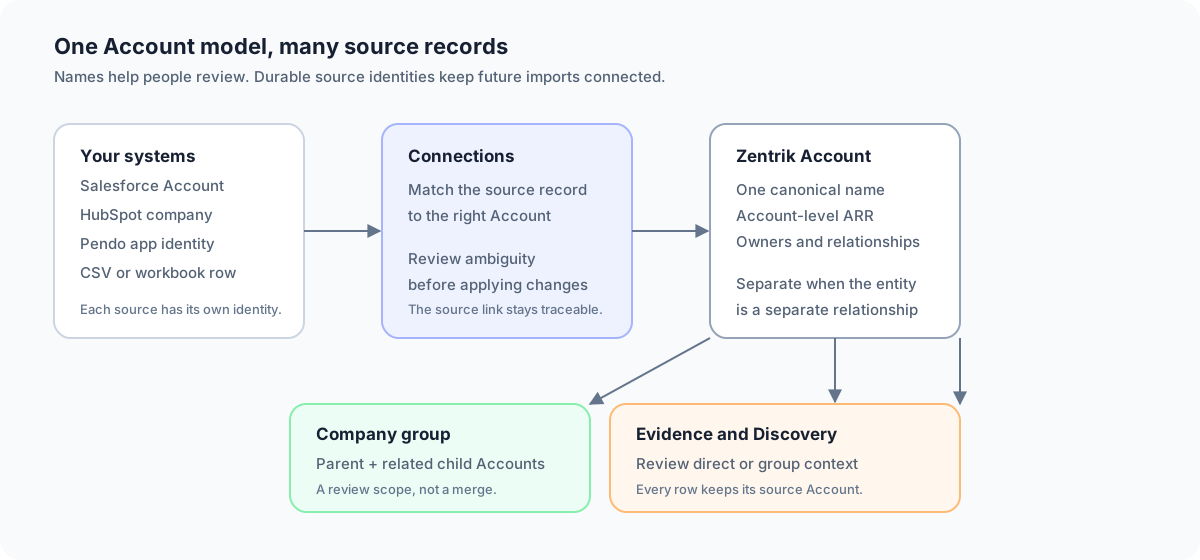
The source record, the Account, the company group, and the Evidence scope each have a different job. Keeping those jobs separate prevents duplicates and preserves the path back to the original customer record.
The Account model
| Term | Meaning |
|---|---|
| Account | A customer entity your team manages in Zentrik |
| Connection | A provider record linked to that Account, such as a Salesforce Account |
| Company group | A parent Account and its related child Accounts |
| Evidence | A source-backed claim associated with the customer that supplied it |
A company group keeps its members separate. It does not merge their records or automatically total their revenue.
Use names people recognize. Keep provider IDs, domains, and parent relationships in their own fields.
Connect your systems
Connect the systems that hold customer identity and the systems that hold customer evidence. The source of an identity and the source of an insight do not need to be the same system.
Salesforce and HubSpot
Salesforce and HubSpot can provide customer identity, account fields, owners, contacts, deals, and revenue context.
When the provider exposes a readable parent relationship, Zentrik can use it to suggest a company group. Salesforce uses the Account parent relationship. HubSpot uses its standard company-to-company parent association. A custom label or a shared domain is not enough to create a parent-child relationship.
The connection keeps the provider and its record identity with the Account. A later sync can refresh fields on that same Account instead of creating another one. Zentrik reads these systems for matching and context; it does not write account changes back to the CRM.
Pendo and other sources
Pendo is mainly a source of product sentiment and feedback. Its account identity is scoped to a Pendo app, so the same text value in two apps should not be treated as the same customer until you review it.
Other sources can attach evidence to an existing Account without defining the company hierarchy. That is useful: the system that knows a customer relationship best can remain the source of identity, while the system that knows product usage or feedback supplies the evidence.
Matching and imports
Zentrik first reuses a known provider link or a reviewed mapping. Otherwise, it checks available identities, domains, and names. An unclear match stays for review.
A shared domain, name fragment, or parent name does not automatically merge Accounts. Check whether the records describe the same customer relationship.
Teach a reusable naming rule
Open Accounts → Review, choose Link on an unlinked source, and select the existing Account it belongs to. Find similar matches from this pair uses that confirmed pair to propose a naming rule. Review the explanation and the matched sources before saving. The advanced expressions are available when you need to adjust the pattern yourself.
The preview shows how many source identities and distinct Accounts match. Competing matches remain in Review. A rule applies to its source connection and never creates or merges Accounts.
Choose what happens next:
- Save rule adds clear suggestions to Review with a Match status. It does not link the existing queue automatically.
- Also link these sources now links the previewed, unambiguous sources and updates their managed records. Individual record exceptions are preserved. Sources that changed while you reviewed them remain for another decision.
- Automatically link future matches lets later imports use the approved rule when one Account matches. Leave it off to approve future suggestions in Review.
Use Matching rules from the Accounts page, or Settings → Account matching, to review, edit, pause, or delete rules. Pausing or deleting a rule keeps existing links. Pendo and SurveyMonkey history use their dedicated Account linking flows.
Choose the Account name
Use the customer name your team recognizes. Add a location, region, or legal suffix only when it distinguishes a separate relationship. Keep IDs, URLs, and temporary import labels out of the name.
For example, keep Northstar Dental - Austin and Northstar Dental - Denver separate when they are separate customer relationships. Group them under Northstar Dental when that parent relationship is known.
Review before applying
For a normal integration import, preview the proposed matches, approve clear rows, and resolve the small set of ambiguous rows separately. Once a provider record is linked, later imports can use that durable link.
For a large workbook or a file that combines CRM IDs, billing IDs, family IDs, URLs, and proposed parents, use a staged review:
- Confirm what one row represents. It may be an Account, a location, a contract, or a revenue snapshot.
- Preserve every source namespace in its own column. A Salesforce ID, billing ID, and family ID are different keys.
- Propose the Zentrik Account, canonical name, parent, and action: link, create, keep separate, merge, or review.
- Check duplicate and parent claims in small batches before applying them.
- Keep the source file and the review decision so the result can be explained later.
Do not load a complex workbook as a list of new Accounts first. That creates duplicates before the source identities and row grain have been understood.
Company groups and Evidence
Open an Account’s Evidence and choose This account for direct evidence or Company group for the parent and its descendants. Each row keeps the Account that supplied it.
Connections shows the linked provider records and group relationship. The Account overview stays focused on that one Account.
ARR and Discovery links
ARR means annual recurring revenue. It remains an Account-level value. Do not sum a repeated family total from every row of a source export; confirm whether the source value represents a contract, location, or whole company.
A company-group evidence view does not change the original Account links or the meaning of linked ARR on product records. Use a checked, source-defined total when you need company-level revenue.
Troubleshooting
Why did two similar records stay separate?
Similarity does not prove that two customer entities are the same. Check whether they have different contracts, locations, owners, or provider records. Merge only when they represent one Account. Otherwise, connect them in a company group.
Why did Zentrik ask me to review a match?
The source did not provide one durable identity, or more than one Account could fit. Review the candidate using the provider record, domain, owner, location, and customer relationship. Your approved mapping makes later imports more reliable.
Why is a parent or company group missing?
The source may not provide a readable parent relationship, the parent record may not be linked yet, or the relationship may still need review. A shared domain or a repeated name does not create a hierarchy by itself.
Why does the company-group view show a child Account name?
Zentrik keeps source attribution visible. The row is still evidence from that child Account. The wider scope helps you see the group pattern without hiding where the evidence came from.
Continue from here
Related guides
Did this guide answer your question?
Your response helps us prioritize missing or unclear documentation.
Still stuck?
Send your question to Zentrik support. This guide will be included automatically.