Explicitly capture selected community feedback and review it with other customer Evidence.
Before you start
You need current authority for the source content and access to the relevant Evidence workflow. Open the post or conversation in portal administration.
A published post, reply or poll is not automatically an Insight or a roadmap decision. Use capture when specific feedback should become part of your product evidence, then review it in Discovery.
Select and approve the source
- Open the content’s management controls and choose More post actions → Save as evidence in Zentrik.
- Select the post or replies that belong in the capture. Do not include unrelated conversation simply because it is available.
- Preview the selected source count and inspect its text and attribution. The preview identifies the imported source as a Signal; it is source material, not an automatically approved Insight.
- Explicitly approve the selected content and start the capture.
- Inspect its status and open the resulting Evidence in Zentrik when available.
Read what is being copied before approval. Customer names, private context and mixed-group conversations require the same care here as when publishing. The capture is a deliberate product record; it is not a live mirror that silently rewrites itself whenever someone edits the conversation.
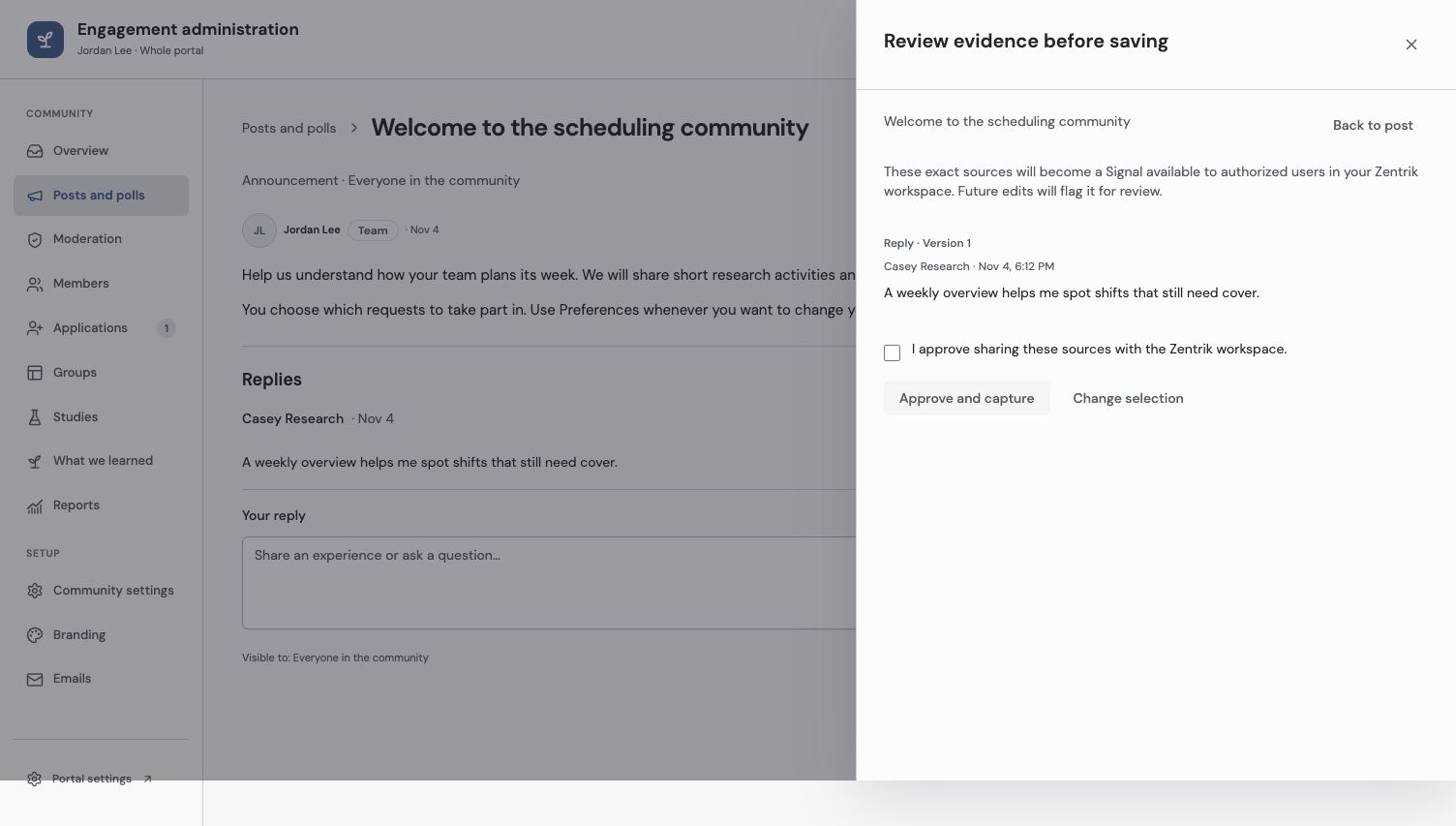
Only the selected source is in this preview. Inspect it before approving a capture into the Zentrik workspace.
Review a source that changed
A later post/reply edit can mark captured content for review. Open the source comparison to understand what changed, then record the appropriate review decision through the available controls.
An immutable captured snapshot preserves what was approved. It does not confer ongoing permission to read the original conversation. Source removal, moderation or reduced grants can make the current source unavailable without making it appropriate to reconstruct or disclose it elsewhere.
If an import is held or fails, inspect the reason and review current permissions and source state before retrying. A queued capture is not evidence that the final record already exists.
Check the Evidence and continue in Discovery
Open the created record and check the selected content, attribution and source reference. Confirm that excluded replies were not included and that the record belongs to the intended workspace.
Use Evidence to insights to review what the source supports, then Insights to opportunities when identifying a recurring customer need. Combine the captured feedback with other evidence rather than treating one contribution as a complete product case.
Publishing a learning update back to the community is a separate customer-facing action. Internal Evidence does not become public because it came from a portal conversation.
Troubleshooting
The source needs review after an edit
Open the comparison and review the changed source through the capture controls. Do not assume the original approval covers new text.
The capture is queued or held
Inspect the recorded status/reason and current permissions. Confirm the final Evidence record before treating the import as complete.
Continue from here
Related guides
Did this guide answer your question?
Your response helps us prioritize missing or unclear documentation.
Still stuck?
Send your question to Zentrik support. This guide will be included automatically.