Publish a reviewed Study follow-up, discovery or roadmap update for the intended community audience.
Before you start
Use What we learned in portal administration. You need current authority for the update’s complete audience. A Study-linked follow-up also respects the underlying Study permissions.
There are two useful paths: complete a follow-up for a closed Study, or publish an independent discovery/roadmap update. The independent update does not fulfill a Study’s separate follow-up obligation.
Publish a Study follow-up
- Close collection in the Study when you have finished receiving responses.
- Open What we learned → Study follow-ups in portal administration and select the Study.
- Review its owner, audience and due date. Closing a distributed Study creates an owned follow-up due 14 days after closure.
- Write what you learned, what is still uncertain and what happens next. A still-evaluating update is useful when you cannot yet make a decision.
- Save and review the customer-facing version. Complete the explicit approval for the current content and audience, then select Publish learning.
Use a title participants can recognize from the research they joined. Summarize the result without exposing raw responses, other customers’ details, internal evidence links or private planning notes. A learning update is not a delivery commitment; state only the next step you can support.
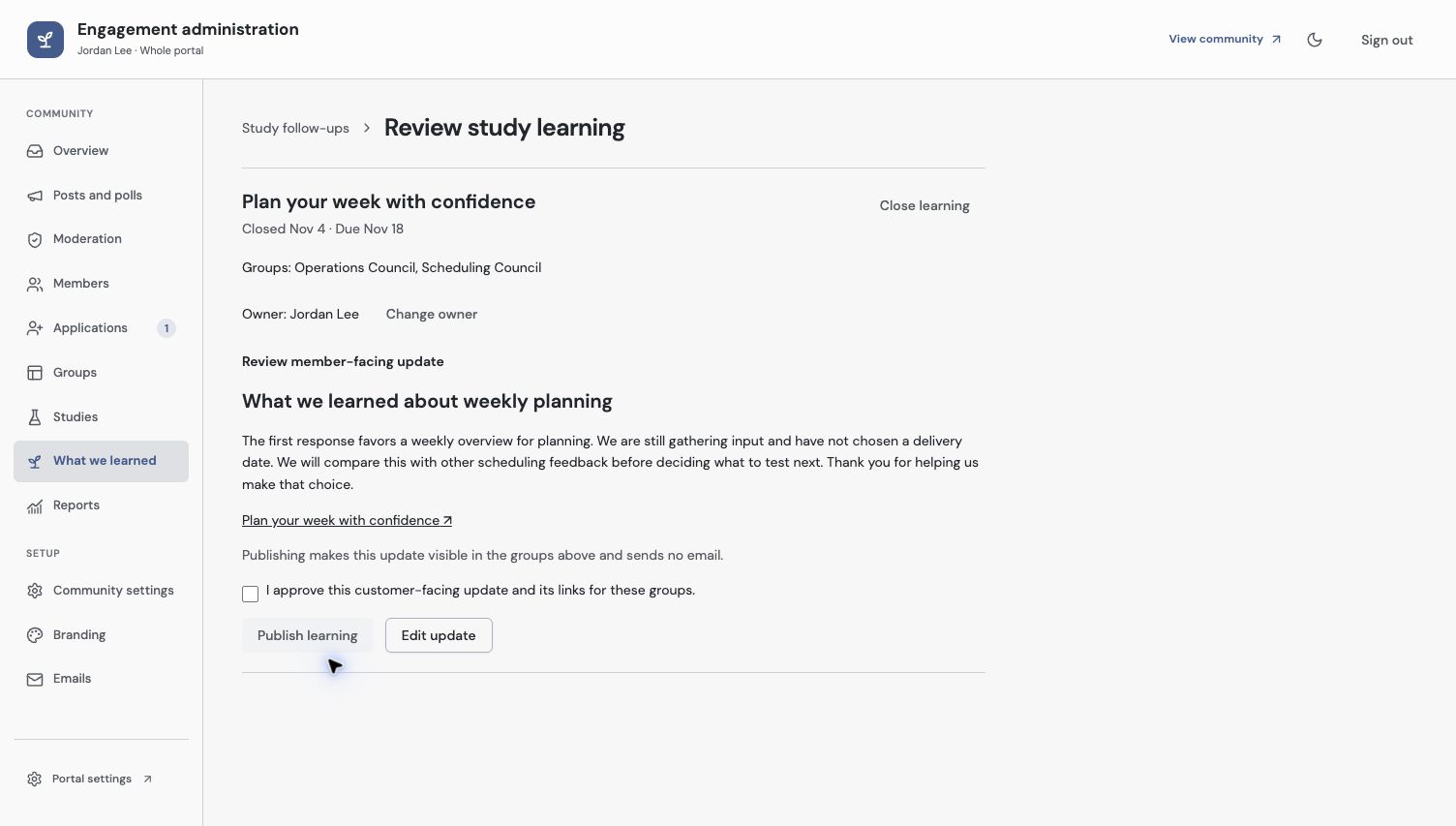
Approve the exact update and links for the listed groups before publishing. Publication sends no email.
Publish a discovery or roadmap update
Use the creation actions in What we learned for an independent learning or roadmap update. Write the customer-facing content in the autosaving editor, choose the audience and explicitly publish it.
This is suitable when the update did not come from one closed Study—for example, a pattern learned across conversations or a current product direction. Keep internal scoring and Evidence in Zentrik. Link to public information only when it helps the member.
Email approval remains separate. Publishing an update does not automatically contact every member or complete the follow-up records of other Studies.
Check the member result
Open What we learned as an eligible member and inspect the published title, body and visible groups. Confirm that the intended Study’s follow-up is recorded as published. A saved draft or approved-but-unpublished revision is not a member-visible result.
If you later edit a published update or change its audience, review the current revision and permissions again. Reopening research and closing it later can affect its follow-up lifecycle; check the current Study follow-up record rather than assuming an earlier update covers the new work.
Continue with participation reports and the internal Study findings guide.
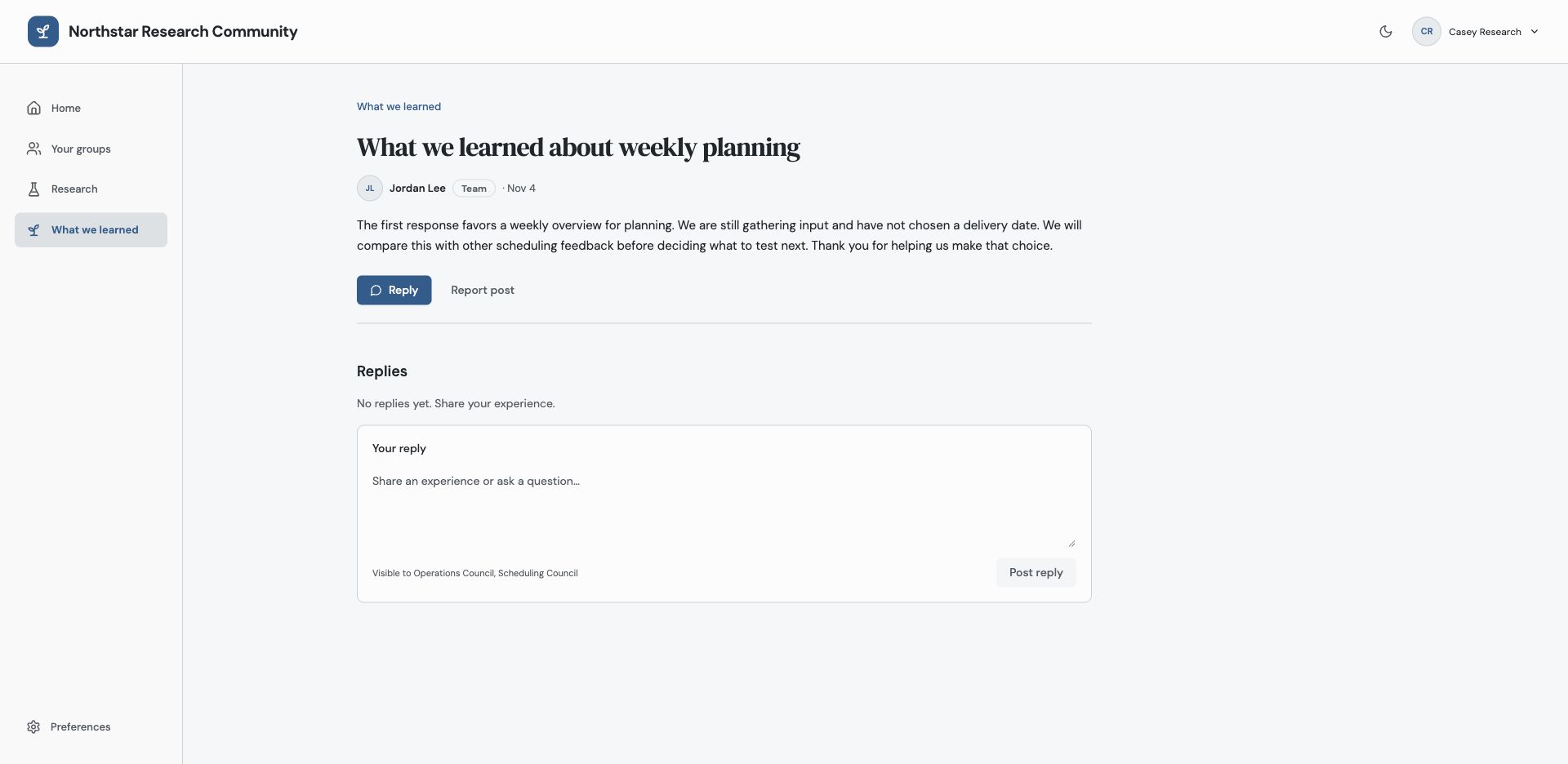
Check the published update with a member identity. A saved draft or independent roadmap post does not complete another Study’s follow-up.
Troubleshooting
The update is saved but members cannot find it
Check that it is published, the explicit approval is for the current revision, and the member has access through the selected audience.
An independent roadmap update did not close a Study follow-up
Independent updates and Study-linked follow-ups are separate records. Open the specific Study follow-up and publish its reviewed result.
Continue from here
Related guides
Did this guide answer your question?
Your response helps us prioritize missing or unclear documentation.
Still stuck?
Send your question to Zentrik support. This guide will be included automatically.